Mistfall Hunter Character Creation: How It Works & Classes
Last updated: September 12, 2026 — creation flow re-verified, with an explicit “does the game have character creation?” and female-character FAQ added.
Quick answer: Mistfall Hunter character creation is pick one of six classes → customize → set a name → create. Build a custom Gyldhunter with body type, face, skin, hair, eyes, makeup, tattoos, scars, and voice — including female characters (Body Type 2).
[!tip] Free Class Switch: Your first class switch at camp via Dew is completely free. Subsequent class switches cost scaling Gold depending on your character level.
[!note] Appearance Reset Cost: Changing gender, body type, or facial features after creation requires 1,000 Gyldenblod at the Gyldenblod Pool located next to Dew.
Nothing is permanent: switch classes via Dew (200 Gold base) or reset your whole look — gender included — through the Gyldenblod Pool for 1,000 Gyldenblod. You start with 3 character slots, up to 10 total.
Mistfall Hunter launches you into the Gyldenmist as a custom Gyldhunter, and its character creator is more detailed than most extraction games.
This guide covers the exact creation flow, every customization category, how many characters you can make, and the two changes everyone asks about: resetting your appearance (including gender) and switching your class mid-playthrough.
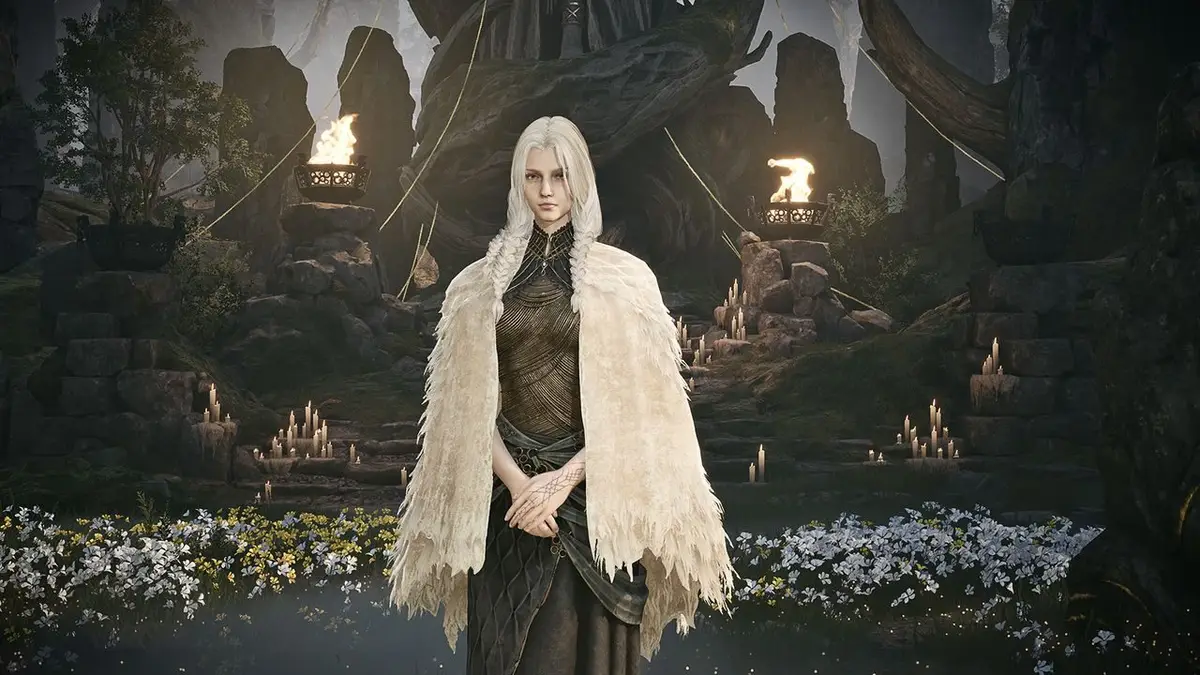
How Does Character Creation Work in Mistfall Hunter?Permalink to this section
Mistfall Hunter character creation works by first selecting one of six starter classes, then customizing your Gyldhunter’s facial presets, hair, skin, tattoos, and voice before choosing a character name.
The creation flow is a straight line — choose a class → customize → set a name → create — and none of it is permanent:
- Step 1 — Choose a class. Pick one of the six classes: Mercenary, Sorcerer, Blackarrow, Shadowstrix, Seer, or Withered Knight. Per TposeGaming’s launch-window breakdown (August 3, 2026), the class pick comes first and drops you straight into the editor.
- Step 2 — Customize your Gyldhunter. The editor opens after your class pick. Work through every category in the table below — body type, face, skin, hair and eyebrows, eyes, makeup and freckles, lips, tattoos and scars, and voice. There is no separate race or species pick: the only body-defining choice is Body Type 1 or 2 (male or female).
- Step 3 — Set a name. When you are happy with your look, select Finish Editing, type a name, and hit Create Character to launch into the playthrough. Your name is set at creation and stays with the character.
The Key Choice: Which Class Do You Pick?Permalink to this section
The class pick is the only choice that changes how you fight — everything after it is cosmetic. Each class brings its own weapons:
| Class pick | Weapons | How it plays |
|---|---|---|
| Mercenary | Hammer, Sword & Shield | Beginner-friendly frontline fighter — the most common first pick |
| Sorcerer | Staff | Ranged mage with the highest damage ceiling |
| Blackarrow | Bow | Ranged marksman, strong for solo runs |
| Shadowstrix | Dagger, Dual Blades | Stealth assassin, high-skill PvP ambusher |
| Seer | Catalyst, Mace | The only healer — best in coordinated trios |
| Withered Knight | Greatsword, Polearm & Shield | Balanced melee duelist, strong after launch buffs |
The “how it plays” notes summarize the launch-window community consensus compiled on the Best Class to Start With and class tier list pages; the full classes index lists every weapon and skill set. Your pick is not a commitment — you can switch classes at camp for a Gold fee (below), so treat the first class as a starting point.
Character Editor: Every Customization CategoryPermalink to this section
| Editor section | What you can customize |
|---|---|
| Body type | Two presets — Body Type 1 and Body Type 2 (male and female) |
| Face | 24 face presets per body type, each with its own baked-in facial features, hairstyle, and beard |
| Skin | Skin type (age/roughness), skin tone, and skin glossiness |
| Hair & eyebrows | 28 hairstyles, hair color, hair glossiness; facial hair and color on Body Type 1 |
| Eyes | Left and right eye edited separately (check the box to sync them) — iris and pupil size, brightness, sclera, eye color, and eye type; plus eyeshadow type, color, transparency, glossiness, and metallic finish |
| Makeup & freckles | Blush type, color, transparency, glossiness, and metallic; freckle type and intensity |
| Lips | Lip makeup — type, color, transparency, and related options |
| Tattoos & scars | Tattoo/body paint type, location, size, and position; scar type, location, transparency, and size |
| Voice | Pick from voice options — you can give a male body type a female voice and vice versa |
| Name | Chosen at the end of creation; the name stays with the character |
One limitation to know up front: the body options are much thinner than the facial ones. There is no race or species pick — the only body-defining choice is Body Type 1 or 2 (male or female), confirmed by the full editor breakdown on YouTube.
There are no chest or thigh sliders and no body-shape sliders at all — just the two body types. It is a common community complaint: a Steam forum thread (August 2026) titled “Game looks amazing, but body type is a let down” collects players asking for more physique options.
How to Change Your Appearance After LaunchPermalink to this section
You are not locked into your original look — but the reset is not free. To change it:
- Go to the Gyldenblod Pool next to Dew in the camp hub.
- Interact with it — the menu shows two options: Upgrade Gyldenblod Pool and Appearance Reset.
- Choose Appearance Reset to reopen the beginning of the character editor.
From there you can change your body type, gender, face, hair, tattoos, and everything else the editor offers, including your voice. The reset costs 1,000 Gyldenblod per use — confirmed by TposeGaming’s guide (August 3, 2026) and a Reddit player report on r/MistfallHunter (August 2026, “Cost currency though. 1k.”).
One guide adds that the Appearance Reset only works in solo mode; that restriction has not been corroborated elsewhere.
Changing outfits and skins is a separate, free system layered on top — see the Outfits guide.
How Many Characters Can You Make?Permalink to this section
You start with three character slots. Upgrading the Gyldenblod Pool at camp adds more slots as a secondary reward — Destructoid (July 31, 2026) and games.gg (August 3, 2026) agree on the progression:
| Gyldenblod Pool level | Character slots |
|---|---|
| 1–2 | 3 (default) |
| 3 | 4 |
| 4 | 5 |
| 5 | 6 |
| 6 | 7 |
| 7 | 8 |
| 8 | 9 |
| 9 | 10 (cap) |
So the maximum roster is ten characters at pool level 9, not five — earlier coverage that said the cap “rises toward five” was outdated. You can create multiple characters per class without wiping older avatars, and you can delete a character to free a slot if you need space. Switch between characters from the login screen.
One practical note: Twitch Drops must be linked to a specific character, so keep your roster organized — see the Twitch Drops guide.
Once your Gyldenblod Pool reaches level 4 and you own a max-level (level 12) character, the pool unlocks Spirit Infusion — spend Gyldenblod to instantly level up your other characters, the fastest way to raise an alt in a second class.
SkyCoach and Legacy Gaming’s launch guides both describe it, and it is a reason many players prioritize the Pool early. See the Gyldenblod and max level guides for the details.
Can You Change Your Class?Permalink to this section
Yes — the class you pick at creation is not permanent. After the tutorial, talk to Dew at camp and choose the class-switch option to return to the class selection screen.
Per GameTyrant (August 2026), a class change costs 200 Gold; Power Up Gaming (August 3, 2026) adds that the fee scales with your level and that the very first switch is free — guides differ on the exact pricing, so expect a level-scaled fee around that range. What carries over:
- Character level — switching does not reset it.
- Warehouse items and materials — everything stays; class-specific weapons and gear become unusable until you switch back, but remain in your inventory.
- Cooldown & Reversion — a cooldown starts after each switch (its length also scales with level, per Power Up Gaming), and a short Reversion window lets you change back to your previous class for free.
Class switching only works at camp via Dew, not during a raid — though you can test the new class’s skills in the camp’s training arena before your next extraction. If you would rather not pay, create a new character in the other class instead — you start back at level 1 and it uses one of your character slots.
Is Character Creation the Same on PC, PS5, and Xbox?Permalink to this section
Yes — no platform-specific differences have been reported. The same editor ships on Steam, PlayStation 5, and Xbox Series X|S, and all three platforms share one server pool, so a character created on any platform works identically in-game. The only platform differences in Mistfall Hunter relate to online subscriptions and cross-progression, not character creation.
Frequently Asked QuestionsPermalink to this section
How does character creation work in Mistfall Hunter? You pick one of six classes (Mercenary, Sorcerer, Blackarrow, Shadowstrix, Seer, Withered Knight) and then customize body type, face, skin, hair and eyebrows, eyes, makeup, lips, tattoos and scars, and voice.
You finish by choosing a name and confirming — your name is set at creation.
Can you change your character’s appearance in Mistfall Hunter? Yes. Interact with the Gyldenblod Pool next to Dew at camp and choose Appearance Reset to reopen the full character editor — body type, gender, face, hair, tattoos, and everything else. Each reset costs 1,000 Gyldenblod, and one guide notes it is only available in solo mode.
Does Mistfall Hunter have character creation? Yes. Every new Gyldhunter goes through a character creator: pick one of six classes, then customize body type, face, skin, hair, eyes, makeup, tattoos, and voice before setting a name. You can build up to 10 characters and re-open the creator later through the Gyldenblod Pool’s Appearance Reset.
Does Mistfall Hunter have character customization? Yes, a detailed one: two body types, 24 face presets each, 28 hairstyles, skin type/tone/glossiness, per-eye editing (including heterochromia), eyeshadow, makeup and freckles, lip makeup, tattoos, body paint, scars, and voice selection.
Can you make a female character in Mistfall Hunter? Yes. The creator offers Body Type 1 and Body Type 2 (male and female), and you can switch between them at any time using Appearance Reset at the Gyldenblod Pool for 1,000 Gyldenblod. Gender is a body-type choice rather than a separate toggle, and there is no race or species pick.
Can you change your class in Mistfall Hunter? Yes. Talk to Dew at camp after the tutorial and choose the class-switch option. It costs 200 Gold at base with the fee scaling by level (one guide reports the first switch is free).
You keep your character level, warehouse items, and materials; class-specific weapons are unusable until you switch back. A cooldown applies, with a short free Reversion window.
How many character slots do you get in Mistfall Hunter? Three by default. Upgrading the Gyldenblod Pool unlocks more — level 3 gives a fourth, and the 10-slot cap is reached at pool level 9. You can delete a character to free a slot.
Is there a body slider in Mistfall Hunter character creation? No. The editor offers just two body types with no chest, thigh, or physique sliders — facial and skin options are extensive, but body options are limited, a point players have raised on the Steam forums.
Can you change gender in Mistfall Hunter? Yes — Appearance Reset at the Gyldenblod Pool reopens the editor and lets you switch body type and gender along with every cosmetic option, for 1,000 Gyldenblod per reset.
Is character creation the same on Steam, PS5, and Xbox? Yes — no platform-specific differences have been reported. The same editor ships on PC (Steam), PlayStation 5, and Xbox Series X|S, and all platforms share one server pool.
Are there races in Mistfall Hunter character creation? No. The editor’s only body-defining choice is Body Type 1 or 2 (male or female) — there is no separate race or species pick. A full breakdown of the creator confirms male and female are the only body presets, with everything else (face, skin, hair, tattoos, scars) layered on top of that base.
How much does it cost to change your appearance in Mistfall Hunter? Appearance Reset at the Gyldenblod Pool costs 1,000 Gyldenblod per use and reopens the full editor — body type, gender, face, hair, tattoos, and voice. Changing outfits and skins is a separate, free system layered on top.
Can you have multiple characters of the same class in Mistfall Hunter? Yes. You can create several characters in the same class without overwriting older avatars, as long as you have a free slot — 3 at start, up to 10 at Gyldenblod Pool level 9. You can also delete a character to free a slot.
SourcesPermalink to this section
- TposeGaming: Mistfall Hunter Character Creation & Appearance Change (Aug 3, 2026)
- Destructoid: How to get more character slots in Mistfall Hunter (Jul 31, 2026)
- games.gg: How to Get More Character Slots (Aug 3, 2026)
- GameTyrant: How to Change Your Class in Mistfall Hunter (Aug 2026)
- Reddit r/MistfallHunter: Can I edit my character’s appearance? (Aug 2026)
- Steam Community: Game looks amazing, but body type is a let down (Aug 2026)
- YouTube: How to Change Appearance in Mistfall Hunter (Change Gender)
- YouTube: Mistfall Hunter All Classes & Character Editor Full Breakdown
- Prima Games: How to Create More Characters in Mistfall Hunter
- NerdsChalk: Mistfall Hunter Appearance Reset: Location, How to Use, and Outfits
- SkyCoach: How to Get Gyldenblod in Mistfall Hunter (Spirit Infusion)
- Legacy Gaming: Wish I Knew Sooner — Tips, Tricks & Game Knowledge (YouTube)
Related GuidesPermalink to this section
- Mistfall Hunter Classes — all six classes and their weapons
- Best Class to Start With — which class fits your playstyle
- Class Tier List — how classes compare at launch
- Mistfall Hunter New Player Guide — from character creation to your first extraction
- Character Outfits — the free outfit and skin system
- Camp Construction — Gyldenblod Pool and other camp upgrades
- Gyldenblod — the currency behind Appearance Reset and Spirit Infusion
- Max Level — the level 12 cap shared by every Gyldhunter
- Mistfall Hunter Guides